How do I learn MongoDb in simple words?
MongoDB is type of NoSQL database, which means document database. Data or records are stored like records, in JSON format. (or) MongoDB is a cross-platform, document-oriented database that provides high performance, high availability, and easy scalability.

Mongo is derived from the word Humongous, which means a lot.
MongoDB is used for storing lots and lots of data init.
MongoDB is type of NoSQL database, which means document database.
Data or records are stored like records, in JSON format.
(or)
MongoDB is a cross-platform, document-oriented database that provides high performance, high availability, and easy scalability.
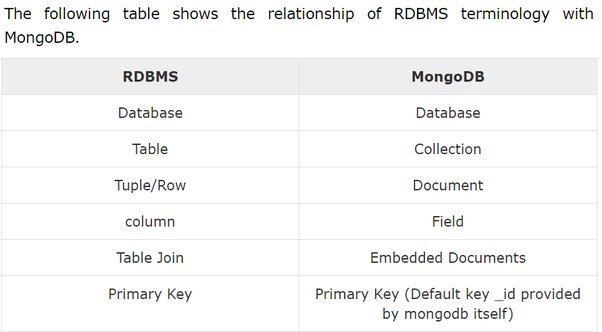
Here are few terminologies, which MongoDB uses
- Collection is equivalent to the RDBMS table. It is a group of MongoDB documents.
- Database is a physical container for collections.
A single MongoDB has multiple databases. - Document is a set of key-value pair. It is similar to a record/row in RDBMS.
For every document inserted in MongoDB, a uniqueId(12 digits) will be generated, which differentiates it from other documents.
12-digit = first 4 bytes for the current timestamp + next 3 bytes for machine id +next 2 bytes for process id of MongoDB server +remaining 3 bytes are simple incremental VALUE.
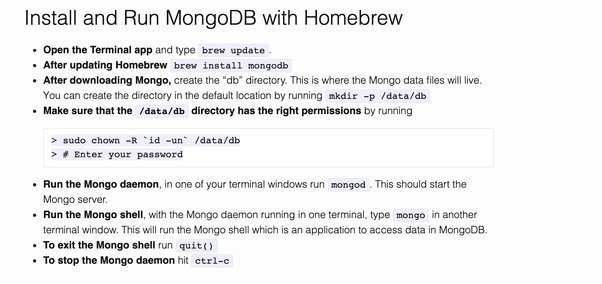
Installation of mongodb on mac through terminal
Some basic commands and setup on windows:
- Download it from
https://fastdl.mongodb.org/windows/mongodb-windows-x86_64-7.0.6-signed.msi
- after selecting a proper version, click next until finish(note it will show installation path, like c:/programfiles/mongodb)
- goto installation folder--> mongodb-->server → 4.0(can be different version)-->data-->create new folder(db)
- open command line--> goto the path (where mongodb is installed upto bin)
- type D:\MongoDB\Server\4.0\bin>mongod --directoryperdb --dbpath D:\MongoDB\Server\4.0\data\db --logpath D:\MongoDB\Server\4.0\log\mongo.log --logappend
- net start MongoDB
Note: if you on mac/linux/unix then use below command.
If you get brew is not installed
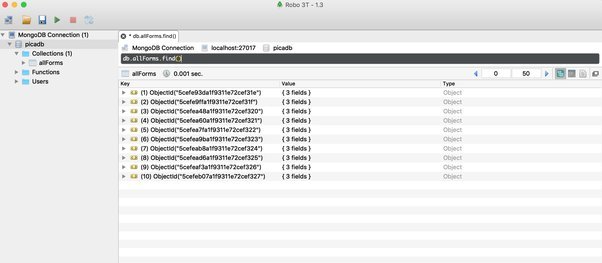
Or just download RoboMongo and give the installation configuration and connect it
Download RoboMongo from https://download-test.robomongo.org/mac/robo3t-1.3.1-darwin-x86_64-7419c40.dmg (https://download-test.robomongo.org/mac/robo3t-1.3.1-darwin-x86_64-7419c40.dmg)
commands and functions:create database: use mycustomers
create user: db.createUser({user:'system',pwd:'admin',roles:['readWrite','dbAdmin']});
create collection: //collection are like tables in RDBMS
db.createCollection('customers');
show collections
insert documents in collection:
db.customers.insert({first_name:'Muhammed',last_name:'Younus'});
db.customers.insert({first_name:'Santosh',last_name:'Kumar'});
db.customers.insert({first_name:'Satish',last_name:'Mandava',age:35},{first_name:'Suresh',last_name:'mamidi'});
find documents
db.customers.find();
db.customers.findOne();
db.customers.find().pretty();
db.customers.find({first_name:'Santosh'}).pretty();
db.customers.find({$or:[{first_name:'Satish'},{first_name:'Santosh'}]}); //logical OR
db.customers.find({age:{$gt:20}}); //greater than, we can use $gte for greaterthan equals
db.customers.find({age:{$lte:100}}).pretty(); //less than
db.customers.find().sort({first_name:1}).pretty(); //sort in ascending order
db.customers.find().sort({first_name:-1}).pretty(); //sort in decending order
db.customers.find().count(); //count the documents
db.customers.find({gender:'male'}).count();
db.customers.find({first_name:'Muhammed'}).limit(4); //limit
db.customers.find({first_name:{$in:['Muhammed','Younus','Suresh','Satish']}});
in operator
db.customers.find({first_name:{$in:['Muhammed','Younus','Suresh','Satish']}});
and operator
db.customers.find({$and:[{first_name:'Satish'},{last_name:'Mandava'}]}).pretty();
db.customers.find({first_name:'Satish',last_name:'Mandava'}).pretty();
or operator
db.customers.find({$or:[{first_name:'Satish'},{last_name:'Younus'}]}).pretty();
like operator
db.customers.find({last_name:/^You/}).pretty();
lessthan(<),
greaterthan
db.customers.find({age:{$gte:30}}).pretty();
functions:
count()
For-each:
update documents
db.customers.update({first_name:'Muhammed'},{first_name='Syeda',last_name='khan',gender='female'});
db.customers.update({first_name:'Satish'},{$set:{age:45}});
db.customers.update({first_name:'Satish'},{$inc:{age:5}}); //increment number
db.customers.update({first_name:'Satish'},{$unset:{age:1}}); //removes column(unset)
db.customers.update({first_name:'Shaik'},{first_name:'Shaik',last_name:'Zahed'},{upsert:true}); //if the value doesn't exist, it will insert new record.
db.customers.update({first_name:'Syeda'},{$rename:{'gender':'sex'}});
remove documents
db.customers.remove({first_name:'Shaik'});
db.customers.remove({first_name:'Shaik'},{justOne:true}); //this will delete first value with name Shaik
Joins in mongodb: Correct, mongo doesn’t support joins, but there are some situation where we need to refer one collection to another collection
Consider we have two collection(profile, application), both have common column call status.
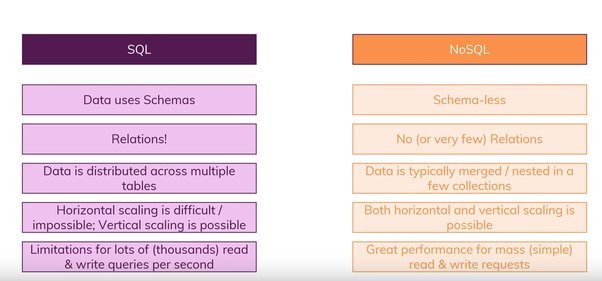
Finally the difference between SQL and NO-SQL